
ChordCalc1.4.2 - App Store
You'll be able to see results in few seconds.
Publisher Description
Now featuring full support for iPad, Retina displays, iOS 6, and iPhone 5!
ChordCalc is an evolving interactive calculator for guitar chords. It includes a fretboard to enter and find chord fingerings in 20 common tunings, plus Chord, Scale, and Circle interfaces to build chords and perform common chord operations. Add extensions, transpose to other keys, harmonize within scales, and more. Or just type in chords by name.
ChordCalc always shows chords in the context of keys and scales, and all its displays are interactive. In the Scale simply drag the chord around to transpose and move through the scale harmonies. The Circle Screen has three well-rounded ways to transpose and harmonize within the key/scale. On 4" devices the a unified circle view supplants the old piano view.
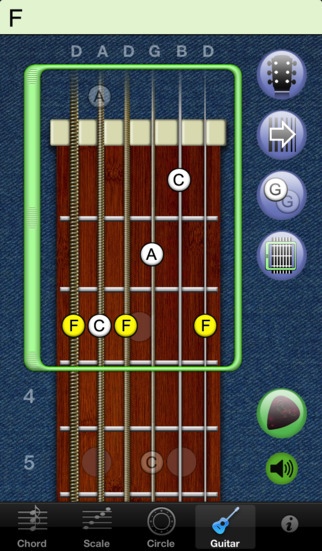
The Guitar interface is based on the guitar palette from the Mac app FretPet, so you can touch the fretboard directly to toggle tones, or use the adjustable bracket to choose a range of frets and let ChordCalc find complete fingerings automatically.
ChordCalc includes all these helpful features:
Type in chords by name
View and select from 11 other names
Build chords from notes, functions, or stacked
intervals
Modify chords in relation to modes, scales,
and keys
View and edit chords by toggling notes in the
Circles of 5ths and Semitones
Harmonize chords with the Circle of Harmonies
View and edit chords on a piano interface (3.5" devices only)
Toggle notes on the guitar fretboard to build
and identify chords
Slide and resize a bracketed region of the
fretboard to auto-generate fingerings
View chord fingerings in more than 20 tunings
including New Standard Tuning
Strum fingered chords
View notes with "Loose Tone Naming" for more
readable notes.
Requires iOS 4.3 or later. Compatible with iPhone, iPad, and iPod touch.
About ChordCalc
The company that develops ChordCalc is Scott Lahteine. The latest version released by its developer is 1.4.2.
To install ChordCalc on your iOS device, just click the green Continue To App button above to start the installation process. The app is listed on our website since 2009-11-02 and was downloaded 0 times. We have already checked if the download link is safe, however for your own protection we recommend that you scan the downloaded app with your antivirus. Your antivirus may detect the ChordCalc as malware if the download link is broken.
How to install ChordCalc on your iOS device:
- Click on the Continue To App button on our website. This will redirect you to the App Store.
- Once the ChordCalc is shown in the iTunes listing of your iOS device, you can start its download and installation. Tap on the GET button to the right of the app to start downloading it.
- If you are not logged-in the iOS appstore app, you'll be prompted for your your Apple ID and/or password.
- After ChordCalc is downloaded, you'll see an INSTALL button to the right. Tap on it to start the actual installation of the iOS app.
- Once installation is finished you can tap on the OPEN button to start it. Its icon will also be added to your device home screen.
Program Details
System requirements
Download information
Pricing
Version History
version 1.4.2
posted on 2009-11-02
Disclaimer
Official App Store Link
We do not host ChordCalc on our servers. We did not scan it for viruses, adware, spyware or other type of malware. This app is hosted by Apple and passed their terms and conditions to be listed there. We recommend caution when installing it.
The App Store link for ChordCalc is provided to you by apps112.com without any warranties, representations or guarantees of any kind, so access it at your own risk.
If you have questions regarding this particular app contact the publisher directly. For questions about the functionalities of apps112.com contact us.
